G
Guest Author
Guest
- Thread Author
- #1
Tired of writing a traditional text resume? Design an infographic resume instead. Now making a great first impression is absolutely within your control.
Did you know that recruiters take an average of 7.4 seconds to scan a resume?
Yes, 6 seconds is all you have to convince the recruiter that you’re well-suited for the role. Given the competitive job market, candidates have to get creative and think of ways to stand out.
Sending those text-heavy resumes might no longer be the best way to stand out. Today, it’s all about presenting information in an easy-to-digest format.
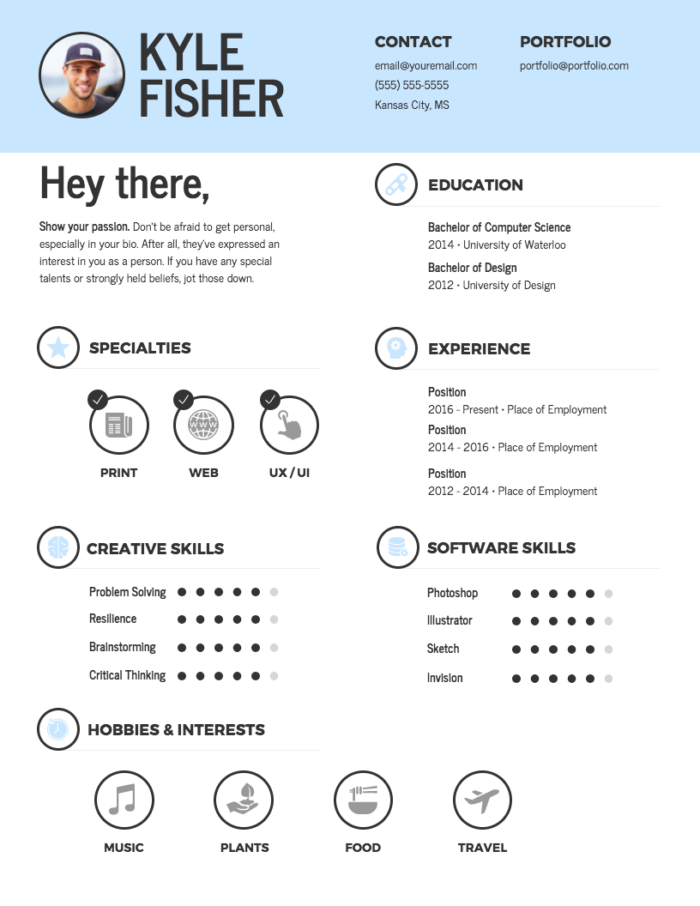
An effective way to convey your qualifications while keeping the recruiter engaged is by creating an infographic resume. This type of resume stands out and captures the reader’s attention because it uses graphics, icons, charts, and other visual elements.
An infographic resume particularly works well if you’re applying for creative roles or if your role requires processing and analyzing data.
Consider the infographic resume to be a visual representation of your profile and send it as an add-on, along with your traditional resume and cover letter.
by Venngage
Here’s how you can design an infographic resume and make a great first impression.
The first step is organizing the information you have and selecting the elements you want to include in the infographic resume. Don’t make the mistake of replicating your original resume and turning it into an infographic because that would beat the purpose.
Read the job description – take note of the skills, assets, and experience they’re looking for. Next up, scan your traditional resume and select the points you plan to include in the infographic.
For instance, you might have 10-12 skills listed but pick the ones that are most relevant to the role you’re applying for while outlining the infographic.
Make sure you create a focussed infographic that follows a logical structure.
Now that you know what you plan to include in the resume, it’s about visualizing that information and selecting the right visual elements to clearly convey your message while highlighting your strengths.
Here are some ideas to get you started:
By Venngage
By Venngage
By Venngage
By Venngage
The idea is to strategically choose the appropriate visual elements that project your candidacy in the best light without confusing the reader.
Colors play a huge role in accentuating your story. While you may be tempted to use several colors that’s just going to make your resume look cluttered and messy. Stick to two to three colors – a dominating color and one or two more to complement it.
You can also use colors to highlight certain information and make them pop out. For instance, why not use a different color to highlight your achievements or draw attention to your contact details?
Regardless of the color scheme you opt for, make sure it remains consistent throughout the resume.
The idea behind using an infographic resume is to condense information and present it in a visually appealing manner. By going overboard with graphics, fonts, and colors, you’ll just end up overwhelming the reader.
The best designs are simple. So, trim the fat and stick to a clean and simple layout that aids reading and strengthens your chances.
Use legible fonts, keep enough white space and let the design follow a logical reading order.
If you come across a role on a job board that directs you to an Applicant Tracking System (ATS), it’s best to not submit an infographic resume because they’re unable to scan visual content.
While you can use an infographic maker and design an attractive infographic resume, what’s equally important is ensuring the content is strong enough to get you shortlisted. So, the design aside, make sure you write a compelling resume that makes an impact.
Want to see more examples?
Check out Venngage infographic resume templates
Simki Dutta is a content marketer at Venngage, a free infographic maker and design platform. When she’s not working, she can be found refreshing her Twitter feed and binge-watching Netflix shows.

Guest Author
The post How to Design an Infographic Resume and Make a Great First Impression appeared first on Career Sherpa.
Did you know that recruiters take an average of 7.4 seconds to scan a resume?
Yes, 6 seconds is all you have to convince the recruiter that you’re well-suited for the role. Given the competitive job market, candidates have to get creative and think of ways to stand out.
Sending those text-heavy resumes might no longer be the best way to stand out. Today, it’s all about presenting information in an easy-to-digest format.
An effective way to convey your qualifications while keeping the recruiter engaged is by creating an infographic resume. This type of resume stands out and captures the reader’s attention because it uses graphics, icons, charts, and other visual elements.
An infographic resume particularly works well if you’re applying for creative roles or if your role requires processing and analyzing data.
Consider the infographic resume to be a visual representation of your profile and send it as an add-on, along with your traditional resume and cover letter.
by Venngage
Here’s how you can design an infographic resume and make a great first impression.
Create an outline
The first step is organizing the information you have and selecting the elements you want to include in the infographic resume. Don’t make the mistake of replicating your original resume and turning it into an infographic because that would beat the purpose.
Read the job description – take note of the skills, assets, and experience they’re looking for. Next up, scan your traditional resume and select the points you plan to include in the infographic.
For instance, you might have 10-12 skills listed but pick the ones that are most relevant to the role you’re applying for while outlining the infographic.
Make sure you create a focussed infographic that follows a logical structure.
Visualize the information
Now that you know what you plan to include in the resume, it’s about visualizing that information and selecting the right visual elements to clearly convey your message while highlighting your strengths.
Here are some ideas to get you started:
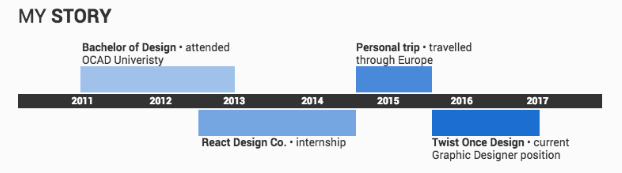
- Use a timeline to show your career progression
By Venngage
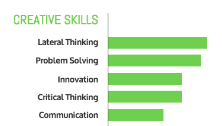
- Use pie charts and graphs to showcase your skills
By Venngage
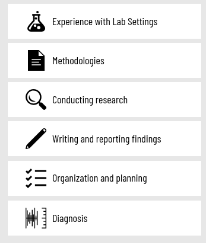
- Use icons to illustrate certain points
By Venngage
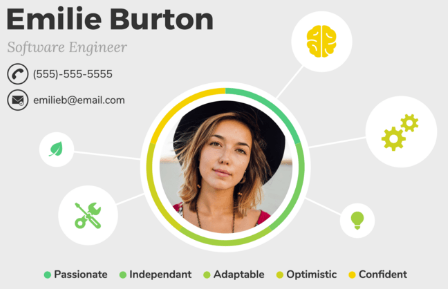
- Use mind maps to showcase your qualities
By Venngage
- Use text boxes to highlight numbers or metrics
The idea is to strategically choose the appropriate visual elements that project your candidacy in the best light without confusing the reader.
Use minimal colors
Colors play a huge role in accentuating your story. While you may be tempted to use several colors that’s just going to make your resume look cluttered and messy. Stick to two to three colors – a dominating color and one or two more to complement it.
You can also use colors to highlight certain information and make them pop out. For instance, why not use a different color to highlight your achievements or draw attention to your contact details?
Regardless of the color scheme you opt for, make sure it remains consistent throughout the resume.
Clean and simple design
The idea behind using an infographic resume is to condense information and present it in a visually appealing manner. By going overboard with graphics, fonts, and colors, you’ll just end up overwhelming the reader.
The best designs are simple. So, trim the fat and stick to a clean and simple layout that aids reading and strengthens your chances.
Use legible fonts, keep enough white space and let the design follow a logical reading order.
If you come across a role on a job board that directs you to an Applicant Tracking System (ATS), it’s best to not submit an infographic resume because they’re unable to scan visual content.
While you can use an infographic maker and design an attractive infographic resume, what’s equally important is ensuring the content is strong enough to get you shortlisted. So, the design aside, make sure you write a compelling resume that makes an impact.
Want to see more examples?
Check out Venngage infographic resume templates
Simki Dutta is a content marketer at Venngage, a free infographic maker and design platform. When she’s not working, she can be found refreshing her Twitter feed and binge-watching Netflix shows.
Guest Author
The post How to Design an Infographic Resume and Make a Great First Impression appeared first on Career Sherpa.